TagList plugin for vim allows you to view list of classes, methods, variables, constants and other tags from index file generated by exuberant ctags. TagList shows tags in a context of files you edit and groups them by type. You can jump to a chosen tag, open it in a new tab or window and do many other useful things.
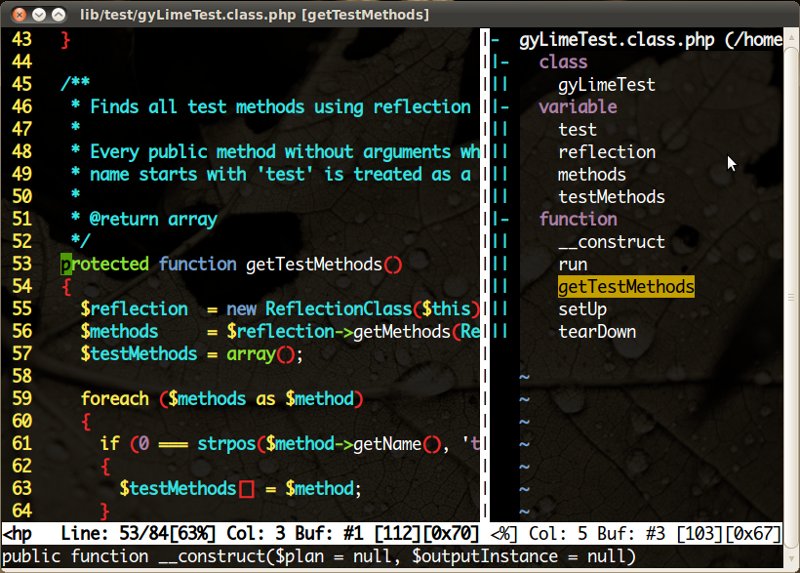
Installation
As usual, get the plugin from the vim website and unzip it into your ~/.vim directory.
To index help topics run vim and type:
:helptags ~/.vim/doc
Thanks to that you'll be able to read :help taglist.txt inside the editor.
Note: TagList plugin uses index generated by exuberant ctags and therefore you need to install it first. I explained how to do it in "Jumping to a class, function and variable definitions in vim with exuberant ctags".
Usage
You can show TagList window by typing:
:TlistToggle
Typing it again or pressing q closes the window.
Of course rather than typing that command over and over again it's better to use shortcut. To use ctrl+l add the following line into your ~/.vimrc file:
nmap <silent> <c-l> :TlistToggle
Configuration
There are many configuration options you can set in ~/.vimrc to customize the plugin. You'll get a total overview by reading help in vim:
:help taglist.txt
I set the window title to display file name and tag my cursor is currently on:
set title titlestring=%<%f\ %([%{Tlist_Get_Tagname_By_Line()}]%)
I also set several other options to tune the TagList behavior a bit:
let Tlist_Use_Horiz_Window=0
let Tlist_Use_Right_Window = 1
let Tlist_Compact_Format = 1
let Tlist_Exit_OnlyWindow = 1
let Tlist_GainFocus_On_ToggleOpen = 1
let Tlist_File_Fold_Auto_Close = 1
let Tlist_Inc_Winwidth = 0
let Tlist_Close_On_Select = 1
let Tlist_Process_File_Always = 1